Dartmouth Science vs. Myth: Why Aluminum Foil Router Reflectors Work (and When They Fail)
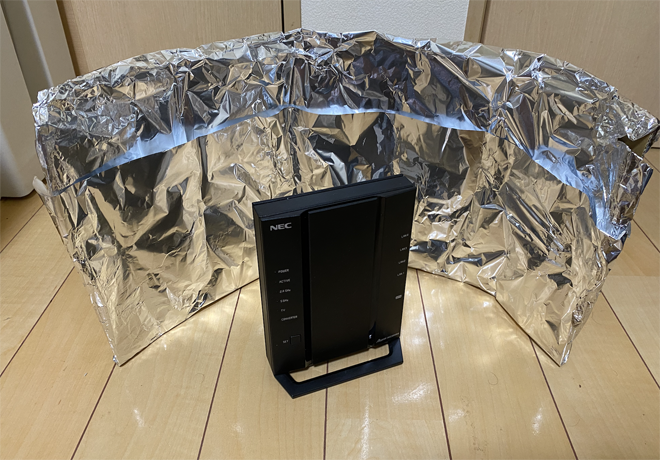
Every few months, a short-form video goes viral claiming that wrapping everyday kitchen aluminum foil around a router will double download speeds. Millions of frustrated renters and homeowners, battling patchy coverage in back bedrooms, reach for Reynolds Wrap in search of a cost-free Wi-Fi dead zone fix. It looks ridiculous, sitting atop a modern piece of networking hardware like a homemade radar dish from a 1950s science fiction set.
Radio frequency engineers do not laugh at the underlying concept. The physics behind metal signal shields is sound, verified by academic research and industrial antenna design. Yet the gap between laboratory results and real-world execution is wide. When built without precise geometric tolerances, an aluminum foil reflector will degrade connections, induce multipath interference, and trap thermal heat inside sensitive consumer radios.
📌 Key Takeaways:
- Core Science: Aluminum acts as an electromagnetic mirror that reshapes omni-directional antenna radiation into a focused beam, increasing forward power while cutting rear signals.
- Academic Validation: Computer scientists at Dartmouth College demonstrated that custom-curved metal reflectors can boost local Wi-Fi signals by up to 6 decibels in targeted rooms.
- Practical Limitations: Improper curvature, uncalibrated focal distances, and modern internal antenna arrays cause severe signal attenuation, latency spikes, and destructive radio reflections.
The Radio Physics Behind Foil Mirrors and Dipole Antennas
Standard home wireless gateways ship with dipole antennas designed to radiate energy outward in an expanding torus, shaped much like a three-dimensional doughnut. This omni-directional antenna radiation pattern spreads signals evenly across 360 degrees on horizontal planes. While convenient when a router sits dead-center in an open floor plan, it wastes half of its transmission power when placed against exterior walls, sending signals into backyards and neighboring apartments.
Household aluminum foil reflects electromagnetic radiation across the microwave frequencies used by consumer networking gear. Both 2.4GHz and 5GHz radio waves feature wavelengths, roughly 12 centimeters and 6 centimeters respectively, that cannot penetrate thin sheets of continuous conductive metal. When electromagnetic waves hit aluminum, the free electrons in the metal oscillate, creating a counter-field that repels the incoming wave. This mechanical interaction turns a simple metallic backing into a passive router antenna directional shield.
Energy cannot be created out of thin air by unpowered household items. An aluminum shield does not amplify radio signals; it redistributes them. Every decibel of gain measured in front of the shield comes directly from signal stolen from behind it. If a homeowner seeks coverage in a north-facing home office, placing a metal plate south of the router steals energy from the southern rooms to illuminate the northern desk.
What the Dartmouth College Signal Study Actually Proved
The DIY community gained academic backing when researchers at Dartmouth College, led by assistant professor of computer science Xia Zhou, published peer-reviewed findings on custom reflector performance. The team designed a software system called WiPrint, which analyzed specific floor plan geometries to calculate optimal shapes for passive reflectors. Rather than relying on uniform, symmetrical parabolas, the researchers 3D-printed custom polymer frames coated with commercial aluminum foil.
The academic results were clear. In controlled test environments, carefully optimized reflectors increased signal strength by up to 55.1% (approximately 4.5 dB to 6 dB of gain) in targeted zones. At the same time, the metal barriers intentionally suppressed signals by up to 10 dB in zones outside the house, offering an unexpected layer of physical network defense against drive-by snooping.
The Dartmouth study carried a critical caveat that viral videos routinely ignore: the reflectors required sub-millimeter precision. When the researchers tested flat, creased, or improperly angled surfaces, the reflective gains collapsed into chaotic signal bounce. The team demonstrated that while thin metal redirection works, arbitrary shapes cut from kitchen rolls behave like cracked funhouse mirrors rather than optical lenses.
Building a Functional Parabolic Reflector: The Engineering Method
Those testing the approach at home must avoid simply wad-wrapping antennas in crinkled foil. Achieving measurable signal direction requires constructing a parabolic reflector template with an exact mathematical focal point. A true parabola collects and straightens parallel lines of energy, converting dispersed waves into a focused, coherent path.
1. Substrate preparation: Trace a parabolic curve onto stiff corrugated cardboard or poster board. The base requires two precise cutouts to slide securely over the plastic housing of an external router antenna.
2. Foil application: Cut a smooth sheet of heavy-duty aluminum foil. Wrinkles cause micro-deflections that scatter high-frequency 5GHz radio waves. Glue the foil flat against the inner face of the curved cardboard reflector shape, keeping the metallic surface as uniform as glass.
3. Focal alignment: Slip the cardboard collar over the antenna so the dipole element sits directly at the focal axis of the parabolic curve. If the antenna sits two centimeters forward or back from the calculated focus, waves scatter out of phase, degrading data transfer rates.
4. Heat map verification: Before and after installation, audit the target room with a mobile Wi-Fi analyzer heat map application. Testing signal strength across RSSI values (measured in negative decibel-milliwatts, such as -68 dBm moving to -61 dBm) ensures that download gains are real rather than placebo effects.

Signal Metrics Across DIY Materials and Modern Radio Frequencies
Reflective efficiency varies depending on metal density, wavelength, and antenna topology. High-frequency 5GHz signals attenuate rapidly when passing through construction materials, making directional focus appealing, yet they suffer the greatest phase degradation if a reflector surface contains rough wrinkles.
| Hardware Setup | Forward Signal Gain (dBm) | Rear Attenuation | Deployment Cost |
|---|---|---|---|
| Stock Dipole Antenna (Omni) | Baseline (0 dB) | 0 dB (Even dispersion) | $0 |
| Crinkled Foil Wrap (Improper) | -3 dB to +1 dB (Unstable) | -4 dB to -6 dB | |
| Cardboard Aluminum Parabola | +3.5 dB to +5.5 dB | -8 dB to -12 dB | |
| Solid Copper Sheet Alternative | +4.5 dB to +6.8 dB | -12 dB to -16 dB | $12, $20 |
| Commercial Tri-Band Mesh Pod | +12 dB to +18 dB (Dynamic) | Negligible (Active relay) | $120, $280 |
Rigorous decibel signal gain tests reveal that substituting standard foil with a solid copper sheet alternative provides greater rigidity, lower surface resistance, and better attenuation across higher frequency spectrums. Copper sheets hold their curved shape without internal warping, producing cleaner reflection angles on narrow 5GHz and 6GHz channels where millimeters dictate signal clarity.
Why Bad Placement Can Cripple Modern Home Connectivity
Despite real theoretical gains, the DIY foil reflector creates severe unintended consequences inside standard living spaces. The most destructive issue is multipath interference. Radio receivers process both direct and reflected signals. If an aluminum sheet bounces electromagnetic energy back toward the router chassis at poor angles, outbound and returning waves collide out of phase. This creates destructive interference patterns, spiking packet loss and increasing ping latency during real-time video calls and competitive gaming.
Hardware degradation presents another hidden risk. Modern high-throughput routers consume substantial power, venting heat out of plastic side gills. Erecting metallic shields around external antennas frequently blankets thermal vents. Trapped ambient heat causes internal power amplifiers and system-on-chip processors to throttle performance automatically, dropping link rates to safeguard silicon from thermal runaway.
Placing metal too close to antenna stalks disrupts the voltage standing wave ratio (VSWR). Antennas are engineered to transfer energy into free air at a tuned 50-ohm impedance. Placing conductive aluminum directly against the plastic shroud alters that electrical impedance. Instead of radiating forward, a portion of the transmitted RF energy reflects straight back into the router's front-end module, warming the internal circuitry and shortening the operational life of the device.
Beamforming and Internal Antennas in the Modern Wi-Fi Era
The aluminum foil hack was popularized when routers were rectangular plastic slabs sporting two or three adjustable external dipole plastic antennas. Modern consumer networking hardware has evolved past static dipole radiation patterns.
Most current home routers, particularly those operating on Wi-Fi 6, Wi-Fi 6E, and Wi-Fi 7 standards, abandon visible external antennas altogether. Flagship devices from vendors like Netgear, Asus, and Eero conceal complex multi-element antenna arrays inside monolithic internal towers. Wrapping foil around these internal-antenna plastic chassis shields the radios indiscriminately, suffocating transmission in all directions.
Modern access points manage signal direction through electromagnetic beamforming. Utilizing advanced digital signal processing and multi-user MIMO (MU-MIMO) architectures, modern routers detect client devices in space and continuously adjust the relative phase and amplitude of multiple antennas to steer focused radio waves toward phones and laptops. Installing a static aluminum foil reflector breaks this digital handshaking: the router attempts to beam signals through a wall, encounters a mechanical metal mirror, and gets blinded by its own reflections.
Frequently Asked Questions (FAQ)
Q1: Can aluminum foil cause physical electrical damage to my home router?
A1: Foil carries no direct current, but placing conductive sheets within millimeters of an antenna element alters radio impedance. This mismatch reflects excess RF energy back into the output amplifiers, increasing internal running temperatures and potentially degrading radio performance over time.
Q2: Does shiny-side or dull-side placement change signal strength?
A2: The distinction has zero impact on radio waves. The visual difference between the shiny and dull sides of aluminum foil results from mechanical steel rollers during the factory manufacturing process. At 2.4GHz and 5GHz microwave frequencies, the conductivity and skin-depth reflectivity of both sides are identical.
Q3: Will an aluminum reflector help if my router uses internal antennas?
A3: No. Modern internal-antenna gateways pack omni and directional elements in tight, factory-calibrated three-dimensional layouts. Taping aluminum foil to the exterior of an integrated chassis blocks air circulation and blankets the internal radios blindly, triggering broad drops in overall network bandwidth.
The Practical Verdict on Passive Reflectors
Building a cardboard and foil reflector remains a compelling physics demonstration. It proves that invisible radio waves obey the foundational laws of geometric optics, showing that focused passive metals can direct microwave energy with noticeable results under rigid conditions. If you operate an older, low-cost router equipped with dual external dipoles and need to reach an isolated desktop across the house without spending a cent, a mathematically aligned parabolic card will deliver a noticeable boost.
As a permanent networking strategy on modern hardware, the technique creates far more problems than it solves. Contemporary multi-band routers rely on dynamic beamforming algorithms that adjust to your physical environment in milliseconds. Dropping an uncalibrated metallic shield into that computing loop blinds the system, traps operational heat, and cuts off whole rooms from wireless coverage. Spending twenty dollars on a properly placed MoCA adapter, running an Ethernet backhaul, or migrating to a dedicated mesh node yields reliable speeds that kitchen foil can never match.