Exact Button Locations: Visual Guide to Adjusting Volume on Oki Doki GOLD, DUO, and BLACK
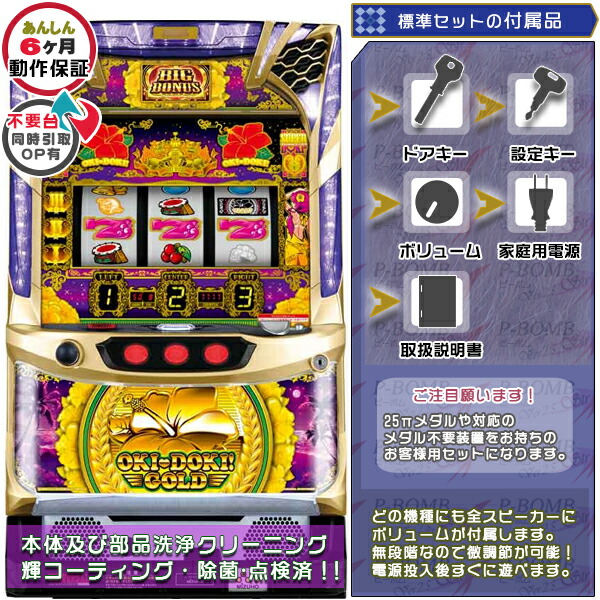
Walking the aisles of a Japanese pachinko and pachislot hall exposes players to an unrelenting wall of sound, frequently exceeding 85 decibels. For enthusiasts sitting down at Universal Entertainment’s premier 30-pip and 25-pip slot series, headlined by the glowing red hibiscus lamps of Oki Doki, managing that sensory output is essential. While early iterations left players at the mercy of earplugs, modern cabinets give seated players direct control over output levels right from the console.
Finding the exact menu trigger remains an exercise in frustration if you sit down mid-session. The physical layout shifted between unit generations, transitioning from basic internal factory settings to user-facing cross-key configurations. Knowing the exact sequence to lower the decibels spares your hearing and prevents unwanted attention from irritated neighbors on the parlor floor.
📌 Quick Summary:
- Core Mechanism: Modern Oki Doki cabinets only allow volume changes when the machine sits completely idle in a standby state with no active credit spin.
- Button Locations: DUO, GOLD, and BLACK use either directional cross keys beside the reel glass or the central illuminated push button to bring up on-screen volume bars.
- Hard Floor Limits: Machine hardware prevents total muting, enforcing a minimum audible threshold determined by internal hall manager settings.
Why Universal Entertainment Reworked Player Audio Controls
For years, pachislot cabinets treated sound management as an internal administrative task. In Unit 5 machines like the original 2014 Oki Doki, audio levels were controlled via manual potentiometer dials locked inside the front door. Hall staff set the volume at maximum capacity to project winning fanfare across the floor, drawing attention to hitting streaks. Players who found the chimes piercing had no recourse other than ear protection.
The regulatory shift to Unit 6 hardware and modern health awareness pushed manufacturers to rethink cabinet ergonomics. Universal Entertainment, alongside subsidiary brands Acros and Eleco, modernized its front-facing interface starting with Oki Doki 2 and refined it substantially through the 6.2-era Oki Doki DUO, the 6.5-era Oki Doki GOLD, and the 2024 release Oki Doki BLACK.
Giving players control directly cut down on disputes over floor volume. Modern cabinets split the audio feed across sub-reel speaker controls and cabinet-top tweeters, piping custom tracks like "Kana-chan's Song" and "Everlasting Love" without blowing out the player's eardrums. Yet these menus remain hidden until you trigger the correct operational state.
Standby Screen Execution: Entering the Audio Menu
The most common stumbling block when attempting an Oki Doki volume adjustment is input timing. The software locks out interface adjustments while a game is actively resolving. If you insert a medal, register electronic credits, or pull the start lever, the directional pad inputs will not register on the audio sub-board.
To access the pachislot volume adjustment menu, the machine must sit in a standby screen state. Wait for the reels to come to a complete stop. Do not press the max bet button. Once the idle animation appears on the sub-monitor or small digital display, the machine accepts secondary menu inputs.
On machines running Universal’s modern interface, the adjustment procedure follows this baseline sequence:
First, verify the credit meter is inactive or resting. Second, press the directional cross-key, located to the right or left of the center console depending on cabinet type, or depress the main interactive push button once. A horizontal volume meter with increments typically ranging from 1 to 6 will appear on the liquid crystal display. Tap left or down to decrease the output, or right and up to increase it. Once set, leaving the buttons untouched for roughly three seconds saves the parameter and returns the cabinet to standard demo playback.
Console Variations Across Modern Oki Doki Generations
Universal Entertainment deployed slightly different hardware shells for the DUO, GOLD, and BLACK revisions. While the operating logic stays consistent, the specific button configuration differs between models featuring a full LCD monitor and those relying on minimalist digital readout lamps.
| Model & Release Era | Control Mechanism | Display Feedback | Adjustable Range |
|---|---|---|---|
| Oki Doki 2 (2020, Unit 6.0) | Touch sensors / PUSH toggle | Segment LED lamp indicator | Levels 1, 4 |
| Oki Doki DUO (2021, Unit 6.2) | Cross keys on lower right panel | Center LCD sub-monitor | Levels 1, 6 |
| Oki Doki GOLD (2022, Unit 6.5) | Directional pad beside reel housing | Mini-display / Hibiscus blink pattern | Levels 1, 5 |
| Oki Doki BLACK (2024, Unit 6.5) | Cross keys + Central PUSH button | Sub-screen status pop-up | Levels 1, 6 |
The addition of the central LCD on Oki Doki DUO made audio configuration straightforward. Players could monitor changes visually through a graphical volume bar. Oki Doki GOLD, conversely, stripped out the large LCD screen to return to a classic physical cabinet aesthetic. That design choice confused players who expected a graphical interface, requiring them to listen closely for audio tone confirmations while stepping down through the levels.

Button Geography on DUO, GOLD, and BLACK Consoles
Locating the control cluster requires a quick scan of the cabinet perimeter. On the Oki Doki DUO cabinet, look directly to the right side of the coin slot below the reel glass. You will find a distinct directional pad with a central confirmation button. Tapping the directional cross key immediately brings up the Universal Entertainment menu navigation on the display screen mounted between the hibiscus lamps.
The layout on Oki Doki GOLD sits lower. Universal placed the cross key sound settings near the payout tray alongside the headphone/sub-board panel. Because GOLD lacks an elaborate video screen, cycling through volume levels triggers an ascending or descending chime. Keep tapping the down directional pad until the chime hits its lowest frequency.
On Oki Doki BLACK, the manufacturer adopted an updated control layout. The machine integrates a prominent interactive push button flanked by directional arrows. Pressing the directional buttons during the demo loop summons the sound gauge. If you find the machine set to an ear-splitting volume by the previous player, pressing the down arrow three times drops it immediately to comfortable listening levels.
Hall Caps and the Hardware Minimum Volume Threshold
No matter how many times you tap the down button on a pachislot cabinet, you cannot fully mute the sound. Japanese gaming industry standards dictate that gaming units must emit audible alerts for operational events, including hopper jams, door openings, bonus payouts, and error states.
A machine's accessible Level 1 setting is governed by a master potentiometer inside the locked cabinet door. Hall managers dial this master physical volume up or down based on floor acoustics and store layout. If a manager sets the internal potentiometer to an aggressive level, your minimum volume level will remain noticeably loud even when dialed down to step one.
Hall policies also play an unwritten role. While operators encourage players to keep sound at reasonable volumes to avoid disturbing adjacent rows, cranking a machine to maximum level during a heavy bonus streak violates unwritten parlor etiquette. Players in Tokyo, Osaka, and regional parlors routinely lower their volume to Level 1 or 2 as a standard courtesy upon hitting a long run of big bonuses.
Troubleshooting Unresponsive Audio Inputs
If tapping the directional pad or push button yields zero response, you are almost certainly running into an input lock. Ensure that all three reels are locked in place and that the bet lamps are not illuminated. If you inserted three medals or registered three credits on an automated card unit, the machine enters a spin-ready phase and disables menu input. Spin the reels, let them halt, and touch nothing else before trying the buttons again.
Second, check whether the machine is currently in the middle of a dedicated payout fanfare or bonus sequence. Audio adjustments are routinely restricted during the initialization of an AT (Assist Time) bonus segment. Wait until the background music stabilizes or the game returns to standard play before attempting to adjust your settings.
Frequently Asked Questions (FAQ)
Q1: Can I mute an Oki Doki machine entirely so I can wear noise-canceling headphones?
A1: No. Software programming across all licensed Japanese pachislot machines enforces a hard floor, meaning Level 1 remains audible. This ensures payout alerts and error alarms remain noticeable to both the player and parlor staff.
Q2: Why won't the volume menu appear when I press the cross keys on Oki Doki GOLD?
A2: The machine must be entirely idle. If you have active credits loaded or medals inserted in the hopper path, the cabinet ignores cross-key inputs. Wait for the game to enter its standby demo animation before adjusting your volume.
Q3: Does Oki Doki GOLD have an on-screen display for sound volume?
A3: Unlike Oki Doki DUO, which features a central LCD screen, Oki Doki GOLD uses an LED indicator setup. Changes are confirmed through auditory pitch chimes rather than a visual sound gauge.
Q4: Will turning down the cabinet volume reduce the payout chime sound?
A4: Yes. Adjusting the user volume scales down all general cabinet audio channels, including the spinning effects, stop sounds, and vocal tracks. However, mechanical hopper and coin dispenser noises inside the lower tray will remain unchanged.
Managing Parlor Audio Moving Forward
Modern gaming floors place an increasing premium on player comfort. Universal Entertainment's inclusion of dedicated user controls on the Oki Doki DUO, GOLD, and BLACK lines reflects that shift away from the harsh acoustic environments of older parlors. Locating the directional cross pad and initiating adjustments during the standby cycle takes just a few seconds, keeping the session comfortable for you and everyone playing nearby.